

The Woo Archive Carousel widget shows WooCommerce products in a sliding carousel — the same query options as Woo Archive Products, with arrows, dots, and autoplay controls for the slider itself.
Adding the Widget #
- Open the page in the Elementor editor.
- Search the widget panel for Woo Archive Carousel, under the BEW Elements category.
- Drag it into any section or column.
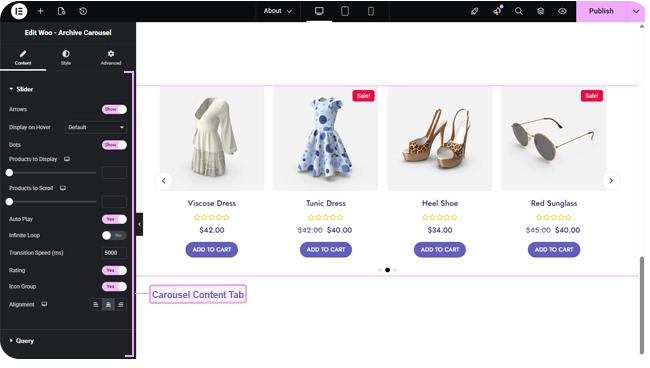
Slider Controls #
All of the following are switched off by default — turn on whichever fit your design:
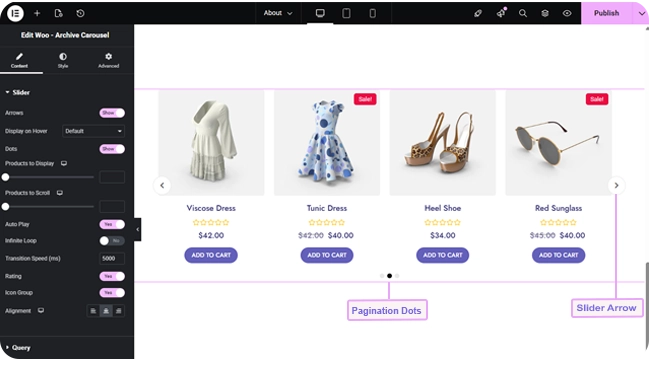
- Arrows — previous/next navigation arrows, with a Display on Hover option to keep them hidden until a visitor hovers the carousel.
- Dots — pagination dots below the carousel.
- Auto Play — automatically advances the carousel.
- Infinite Loop — wraps back to the first product after the last, instead of stopping.
Alongside those, Products to Display sets how many product cards are visible at once (responsive, defaults to 4 on desktop and fewer on smaller screens), Products to Scroll sets how many advance per swipe or arrow click, and Transition Speed sets how many milliseconds each slide transition takes (defaults to 2000). Rating and Icon Group switches (both on by default) show or hide the star rating and the compare/wishlist icon overlay, and Alignment controls text alignment within each card.
Choosing Which Products Show #
The Query section works the same way as Woo – Archive Products: a Source of All Products, Custom Query (category/tag Match or Exclude rules, with an Offset), or Manual Selection, a Number of Products to pull into the carousel (up to 200, defaults to 10), plus Exclude Products, Exclude Current Product, and an Advanced group for Filter By (None / Featured / Sale), Order By, and Order.
Styling #
The Style tab covers the carousel mechanics as well as each product card element:
- Item — card background, border, border radius, box shadow, margin, and padding.
- Arrows — icon color and background, icon size, gap from the edge, and padding.
- Dots — color, active-dot color, hover color, size, and spacing.
- Image — opacity and CSS filters for Normal and Hover, hover transition duration, border, border radius, margin, and padding.
- Title, Price, Rating, Button, Sale, Icon Group — the same set of card-content style sections as Woo – Archive Products (colors, typography, borders, spacing for each).
Frequently Asked Questions #
#
Both are switched off by default. Turn on Arrows and/or Dots in the Content tab’s Slider section.
#
Archive Products lays products out in a static grid with optional pagination; this widget scrolls through them in a carousel instead, with arrows, dots, and autoplay in place of a grid and page numbers.
#
Only if you switch on Infinite Loop. Otherwise the carousel stops at the last product.


