

The Woo Categories widget displays your WooCommerce product categories as an image grid — each category shown with its thumbnail, name, and product count, linking straight to that category’s shop page.
Adding the Widget #
- Open the page in the Elementor editor.
- Search the widget panel for Woo Categories, under the BEW Elements category.
- Drag it into any section or column.
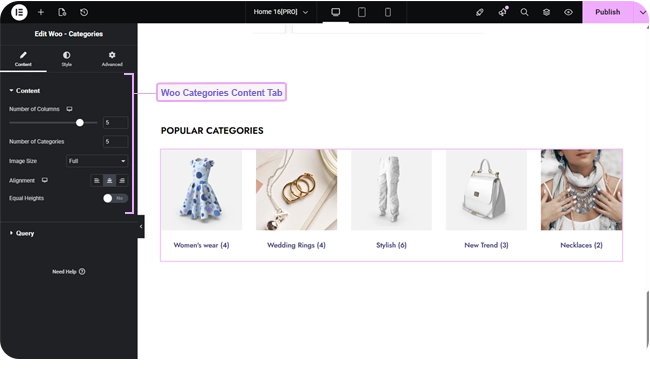
Grid Layout #
- Number of Columns — a responsive slider up to 6.
- Number of Categories — how many categories to show at once (up to 100, defaults to 3).
- Image Size — which registered WordPress image size to use for each category’s thumbnail (defaults to Medium).
- Alignment — responsive text alignment for the category name (defaults center).
- Equal Heights — off by default; switch on to force every card to match the tallest one in its row.
A category without its own thumbnail set falls back to WooCommerce’s placeholder image rather than showing a blank space.
Choosing Which Categories Show #
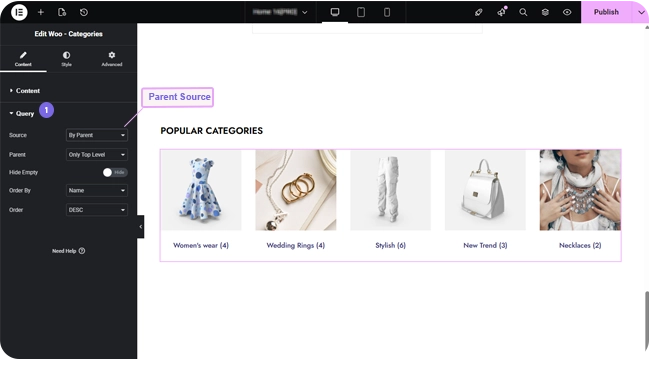
The Query section’s Source control has three modes:
- Show All — every product category on your site.
- Manual Selection — pick specific categories by name.
- By Parent — only the direct subcategories of one chosen parent category.
Hide Empty (on by default) leaves out categories with no products in them. Order By (Name, Slug, Description, or Count) and Order control the sequence.
Styling #
- Item — card background, border, border radius, box shadow, margin, and padding.
- Image — opacity and CSS filters for Normal and Hover, hover transition duration, border, border radius, margin, and padding.
- Title — color, hover color, hover border color, typography, border, border radius, margin, and padding for the category name and its product count.
Frequently Asked Questions #
#
Whatever thumbnail you’ve set on that category in WooCommerce (Products → Categories → edit category). If none is set, WooCommerce’s placeholder image is shown instead.
#
Yes — set Source to By Parent and choose the parent category. Only its direct subcategories will be shown.
#
Not by default — Hide Empty is switched on. Turn it off in the Query section if you want to show categories even before they have products in them.


