Skip to content
default-logo
  • Home
  • Templates
  • Widgets
  • Modules
  • AI Builder
  • Pricing
  • Support
Buy Now

Getting Started

3
  • How to Install & Update BEW
  • How to Install, Activate & Update BEW Pro
  • BEW Dashboard & Settings Overview

How to use BEW Template Library

5
  • Getting started with Template Library
  • About Kits, Pages & Sections
  • Template Library Modal Guide
  • How to Insert Templates
  • Required Plugins When Inserting Templates

How to use BEW Widgets

24
  • Getting started with Widgets
  • How to Setup BEW Site Logo
  • How to use Dropdown Nav
  • How to use Woo Cart
  • How to use Woo Search
  • How to use Woo My Account
  • How to use Woo YITH Wishlist
  • How to use Woo YITH Compare
  • How to use Blog Grid
  • How to use Contact Form 7
  • How to use Woo Categories
  • How to use Woo Products List
  • How to use Woo Categories List
  • How to use Woo Archive Carousel
  • How to use Woo Archive Products
  • How to use Image Carousel [ PRO ]
  • How to use Testimonial Slider [ PRO ]
  • How to use Woo Product Slider [ PRO ]
  • How to use Woo Product Accordion [ PRO ]
  • How to use Woo Product Tabs [ PRO ]
  • How to use Woo Grid Carousel [ PRO ]
  • How to use Woo Hot Deals [ PRO ]
  • How to use Woo Grid Products [ PRO ]
  • How to use Query Management

How to use BEW Site Modules

4
  • Getting started with Site Modules
  • How to use Back to Top
  • How to use Site Preloader
  • How to use Reading Progressbar [PRO]

How to use BEW AI Builder

11
  • Getting Started with BEW AI
  • AI Provider Integration
  • How to use Text Generator
  • How to use Image Generator
  • How to use Bulk Text & Image Generator
  • How to use Repeater Generator
  • How to use Products Generator
  • How to use Blog Generator
  • How to use Saved Presets
  • How to use Generation History
  • Troubleshooting AI Builder

Frequently Asked Questions (FAQs)

1
  • BEW Frequently Asked Questions
View Categories
  • Home
  • Docs
  • How to use BEW AI Builder
  • How to use Generation History

How to use Generation History

3 min read

Every AI generation is saved automatically, so you never lose a version you liked — browse past attempts on any field and restore one instantly, without generating again.

What is Generation History? #

Generation History is a shared feature built into every BEW AI generator — Text, Image, Bulk, Repeater, Products, and Blog. Each time you apply a generated result to a field, that result is saved. Open the field’s history at any point afterward to see what was generated before, and bring any earlier version back with one click.

History is tracked per field, not per generator run. On a card that lists several fields or items at once — Bulk, Repeater, Products, Blog — each individual field or item keeps its own separate history.

Note: Only applied generations are saved to History. If you Cancel a result instead of clicking Apply, it’s discarded and never appears in History.

Where to Find It #

Open the ✨ BEW AI card on any field that has at least one earlier generation. Next to that field’s result, you’ll see a small history icon.
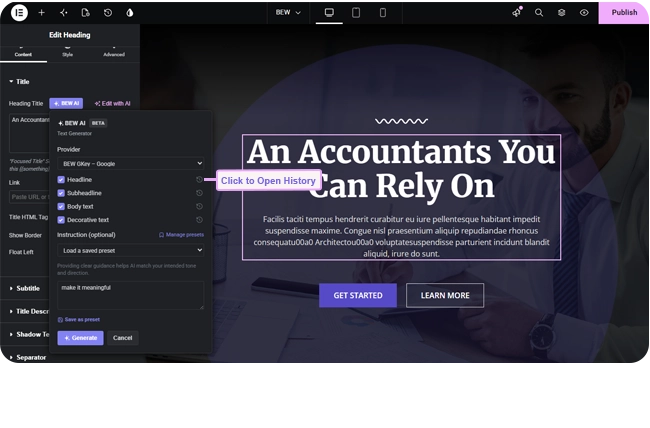
How to Browse and Restore a Previous Generation #

  1. Click the history icon next to the field.
  2. Browse the list of past generations for that field — each entry shows the generated content (or image), which provider and model produced it, and roughly when it was made.

  1. Click Restore on any entry to write it back into the field immediately.

Restoring doesn’t call the AI again — it’s instant, and free, since nothing is generated. It simply puts an earlier saved value back.

Deleting History #

Each entry has its own delete icon, for removing a single generation you don’t want kept. To clear everything at once, use the Clear all history for this page link at the bottom of the History panel — this removes every saved generation for every field on the current page, not just the one field you have open.

Tips #

  • Regenerating isn’t destructive — your previous result is already safe in History before you click Generate again.
  • If you’re comparing a few different instructions, apply each one and check History afterward instead of trying to remember which result you liked best.
  • On Products and Blog Generator, use History rather than Elementor’s Undo to revert a change — those two write directly to the database record, which Elementor’s own page-editor Undo doesn’t cover.

Frequently Asked Questions #

#

No. Browsing and restoring from History never calls your AI provider, so it never uses your API quota. Only Generate and Regenerate do that.

#

It’s available everywhere. History isn’t a Pro-only extra — every generator, free or Pro, gets the same History feature because the generator itself already determines whether a card is free or Pro.

#

No. Clearing history only removes the saved list of past generations — it doesn’t change whatever is currently applied to your fields.

#

No. History is scoped to the page or post you’re currently editing — each page keeps its own separate history.

Updated on September 7, 2026

What are your Feelings

  • Happy
  • Normal
  • Sad

Share This Article :

  • Facebook
  • X
  • LinkedIn
  • Pinterest
How to use Saved PresetsTroubleshooting AI Builder
Table of Contents
  • What is Generation History?
  • Where to Find It
  • How to Browse and Restore a Previous Generation
  • Deleting History
  • Tips
  • Frequently Asked Questions
    • Does History cost anything to use?+
    • Is History available on the free Text Generator, or only on Pro cards?+
    • If I clear history, does that undo any changes on my page?+
    • Can I see history from a different page or post here?+
bew-logo-white

Everything you need to build stores and websites with Elementor: widgets, modules, 2,500+ templates, and AI content generation — all in one plugin.

Company
  • Affiliate Program
  • Privacy Policy
  • Terms & Conditions
  • Blog & News
Support
  • Support Center
  • Documentation
  • My Account
  • Community Forum
Product
  • Features
  • Templates (3,000+ library)
  • AI Builder
  • Plans & Pricing

Copyright © 2026 BEW. Made with

  • by
  • Bosa Themes