

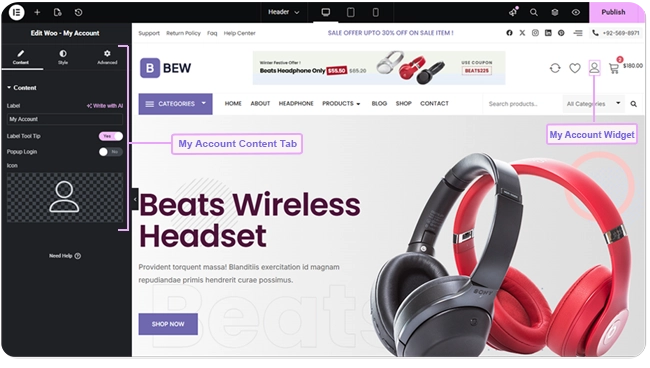
The Woo My Account widget adds an account icon that links to your store’s My Account page — with an optional popup login so visitors who aren’t signed in yet don’t have to leave the page.
Adding the Widget #
- Open the page in the Elementor editor.
- Search the widget panel for Woo My Account, under the BEW Elements category.
- Drag it into any section or column — a header is the most common spot.
Note: This widget needs WooCommerce active. Without it, the widget shows an error notice in its place instead of the account icon.
Icon and Label #
- Label — the text shown with the icon (defaults to “My Account”).
- Icon — pick any icon from Elementor’s icon library (defaults to a user icon).
- Label Tool Tip — switch on to hide the label as regular on-page text and show it as a tooltip on hover instead, leaving just the icon visible normally.
Where the Link Goes #
By default, the widget links straight to your store’s real My Account page. WooCommerce itself decides what a visitor sees there — the login/register form if they aren’t signed in, or their account dashboard if they are.
Popup Login #
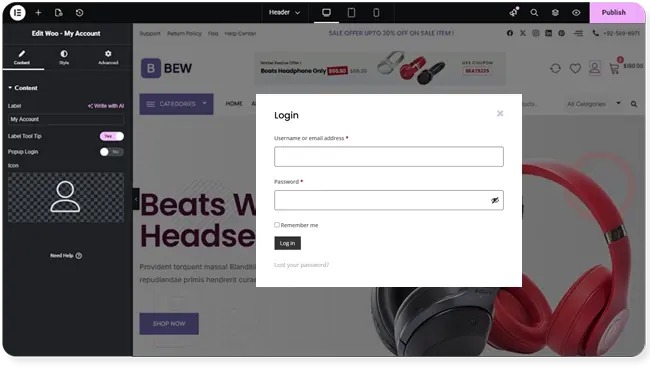
Switch on Popup Login to change this for signed-out visitors only: instead of navigating to the My Account page, clicking the icon opens a popup with the login form right on the current page. Once that visitor logs in, the popup no longer applies — the icon goes back to linking directly to the My Account page, same as the default behavior.
Styling #
The Style tab has two sections:
- Icon — size, color and background for Normal and Hover states, plus border, border radius, margin, and padding.
- Label — typography, text color, and background for Normal and Hover states, plus border, border radius, margin, and padding. These controls style the label whether it’s shown as regular text or as the Label Tool Tip.
Frequently Asked Questions #
#
Yes. Without WooCommerce active, the widget shows an error notice in its place instead of the account icon.
#
It depends on their login state and the Popup Login setting. By default they’re taken to the real My Account page — the login form if signed out, their dashboard if signed in. With Popup Login switched on, a signed-out visitor gets a popup login form on the current page instead; once they’re logged in, clicking the icon goes back to linking straight to the My Account page.
#
It turns the visible label into a tooltip that only appears on hover, instead of permanent text next to the icon.


