

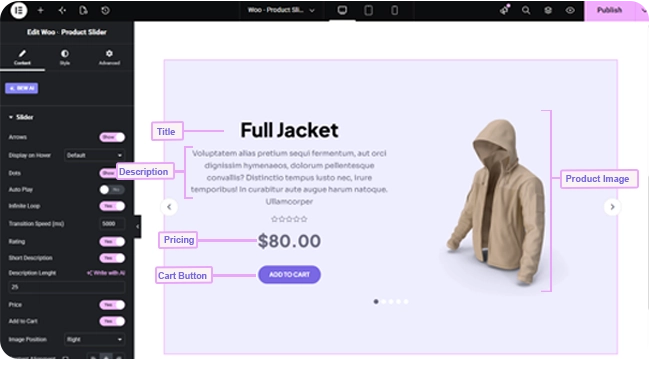
The Woo Product Slider widget shows one WooCommerce product at a time in a full-width, hero-style slide — image, title, short description, rating, price, and an Add to Cart button — cycling through your chosen products.
Note: This widget requires an active BEW Pro license.
Adding the Widget #
- Open the page in the Elementor editor.
- Search the widget panel for Woo Product Slider, under the BEW Elements category.
- Drag it into any section or column.
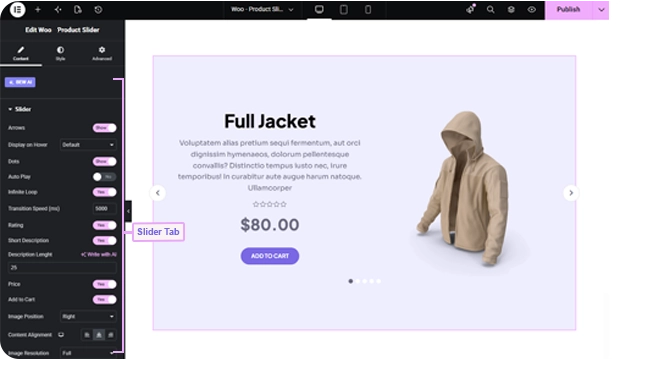
Note: Unlike the grid and carousel product widgets, this one shows a single product per slide — there’s no “products to display” setting, since each slide is a full showcase for one product.
What Shows on Each Slide #
- Rating, Price, Add to Cart — all on by default; switches to hide any of them.
- Short Description — on by default, pulled from the product’s excerpt field (not its full description). Description Length sets how many words are shown (defaults to 25), shown only when Short Description is on.
- Image Position — Left or Right (defaults to Right).
- Content Alignment — Left/Center/Right (defaults Center).
- Image Size — which registered WordPress image size to use (defaults to Medium).
Slider Controls #
Arrows, Dots, Auto Play, and Infinite Loop are all off by default — turn on whichever fit your design. Transition Speed sets how many milliseconds each slide transition takes (defaults to 2000).
Choosing Which Products Show #
The Query section’s Source control has three modes:
- All Products — your full catalog, respecting each product’s WooCommerce catalog visibility.
- Custom Query — filter by category and/or tag, each with its own Match or Exclude rule, plus an Offset to skip a number of results.
- Manual Selection — pick specific products by name.
Regardless of source, you can also set Exclude Products, Exclude Current Product, Number of Products (up to 200, defaults to 10), and an Advanced group for Filter By (None / Featured / Sale), Order By, and Order.
Styling #
- Item — background color, plus a background overlay color and opacity for layering a tint over the slide.
- Arrows and Dots — the standard carousel navigation styling.
- Image — opacity, CSS filters, border, border radius, margin, and padding.
- Title — color, hover color, typography, margin.
- Short Description — color, typography, margin.
- Rating — star color, filled-star color, spacing, size, margin.
- Price — color and typography for the current price, plus separate color and typography for the struck-through original price on sale items.
- Button — typography, Normal/Hover text and background colors, border, border radius, margin, padding.
- Sale — typography, colors, border, border radius, margin, padding for the “Sale!” badge.
Frequently Asked Questions #
#
This one shows a single product per slide as a full hero-style showcase, with a short description alongside the image. Woo – Grid Carousel and Woo – Archive Carousel instead show several smaller product cards per view.
#
It’s pulled from the product’s excerpt field in WooCommerce (Product data → Short description when editing the product), trimmed to the word count you set in Description Length — not the full product description.
#
Both are switched off by default. Turn on Arrows and/or Dots in the Slider section of the Content tab.


