

The Testimonial Slider widget showcases customer quotes in a carousel — each with a rating, author photo, name, job title, and an optional client logo.
Note: This widget requires an active BEW Pro license.
Adding the Widget #
- Open the page in the Elementor editor.
- Search the widget panel for Testimonial Slider, under the BEW Elements category.
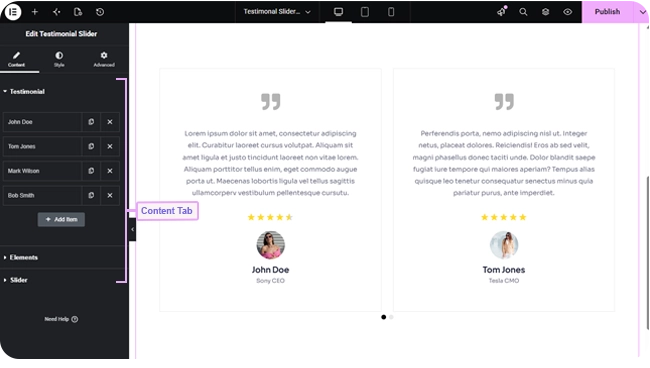
- Drag it into any section or column. It arrives pre-filled with 4 sample testimonials, ready for you to replace with your own.
Adding and Editing Testimonials #
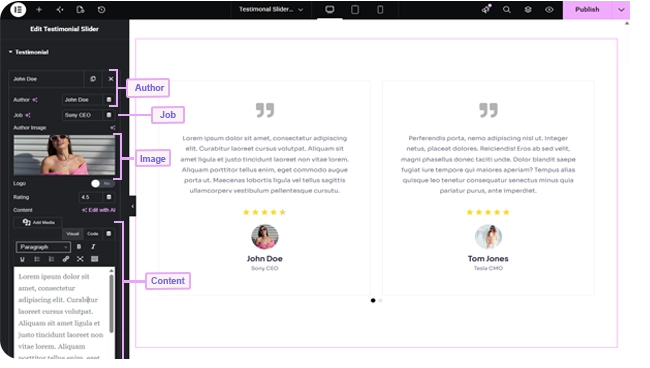
The Testimonial section’s repeater list holds one entry per slide. Each entry has:
- Author and Job — the person’s name and title.
- Author Image — their photo.
- Logo — an off-by-default switch; turn it on to add a Logo Image and an optional Logo URL that makes the logo clickable.
- Rating — a number from 0–10 in 0.1 steps (defaults to 4.5), matched against the Rating Scale set in Elements below.
- Content — the testimonial text itself, in a rich-text field.
Use the repeater’s own add/remove/reorder controls to change how many testimonials you have.
Elements and Layout #
- Enable Quote Icon — on by default; shows a decorative quote icon (pick any icon from Elementor’s library) alongside the testimonial text.
- Image Size — which registered WordPress image size to use for the author photo (defaults to Medium).
- Equal Heights — on by default; keeps every slide the same height.
- Rating — on by default; switch off to hide star ratings entirely. Rating Scale sets how many stars represent a full rating (defaults to 5, shown only when Rating is on).
- Content Alignment — responsive Left/Center/Right (defaults Center).
- Image Alignment — Left, Top (default), or Right, positioning the author photo relative to the name and job title.
Slider Controls #
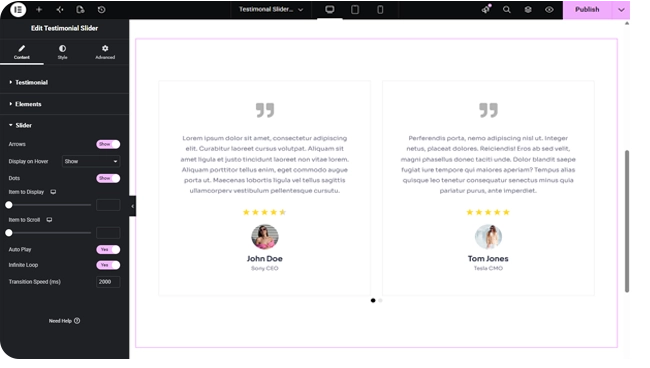
This carousel ships with Arrows, Dots, Auto Play, and Infinite Loop all switched on by default, with Arrows set to appear on hover rather than always. Item to Display sets how many testimonials are visible at once (responsive, defaults to 2), Item to Scroll sets how many advance per swipe or arrow click (defaults to 1), and Transition Speed sets how many milliseconds each transition takes (defaults to 2000).
Styling #
- Item — background, border, border radius, box shadow, item gap, dot gap, margin, and padding.
- Arrows and Dots — the standard carousel navigation styling (colors, size, spacing).
- Quote Icon — color, background, size, border, border radius, box shadow, margin, and padding.
- Rating — star color, filled-star color, spacing, and margin.
- Content — color, typography, margin, and padding for the testimonial text.
- Image — responsive size and spacing, opacity, CSS filters, border, border radius, box shadow, and padding for the author photo.
- Author | Job — alignment, plus separate color, typography, and margin for the author name and job title.
- Logo — responsive size, opacity, CSS filters, border, border radius, box shadow, margin, and padding.
Frequently Asked Questions #
#
Use the repeater list’s own controls in the Testimonial section — duplicate, delete, or drag to reorder entries.
#
Yes — set Rating Scale in the Elements section to any number from 1–10, then set each testimonial’s Rating to match.
#
No — the Logo switch on each testimonial is off by default. Turn it on only for testimonials where you want a company logo shown.


