

The Contact Form 7 widget embeds one of your existing Contact Form 7 forms into an Elementor page, with a full set of styling controls so it matches the rest of your design.
Adding the Widget #
- Open the page in the Elementor editor.
- Search the widget panel for Contact Form 7, under the BEW Elements category.
- Drag it into any section or column.
- In the Content tab, use Select Form to choose from the Contact Form 7 forms already created on your site.
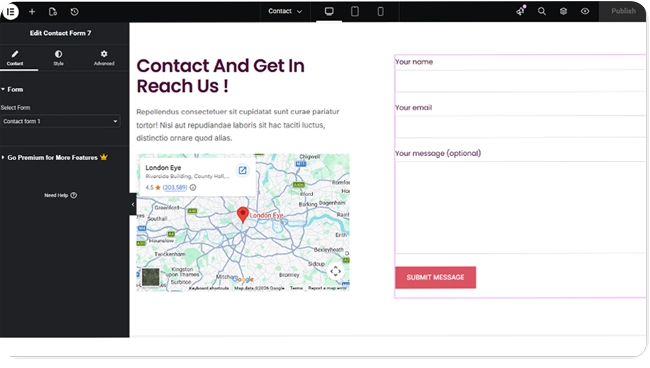
Note: This widget needs the Contact Form 7 plugin active, and at least one form already created in it. It shows an error notice in its place if the plugin isn’t active, and shows nothing if no form is selected.
The form’s fields, validation rules, and where its submissions get sent are all configured in Contact Form 7 itself — this widget only selects which form to display and controls how it looks.
Styling #
- Label — a Show/Hide switch (on by default), color, typography, and alignment for field labels, plus a Not Valid Notices group for the color and typography of the small inline tips CF7 shows under an invalid field.
- Inputs and Textareas — background, text color, and border color across Normal, Hover, and Focus states, plus typography, placeholder color, border, border radius, box shadow, margin, and padding. Applies to text-style fields only — not the submit button, checkboxes, or radio buttons.
- Submit Button — text color and background across Normal, Hover, and Focus states, typography, border, border radius, box shadow, margin, padding, and a Full Width Button switch.
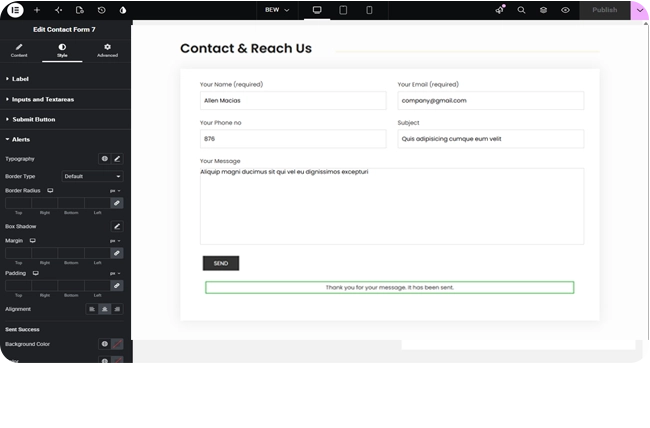
- Alerts — typography, border, border radius, box shadow, margin, padding, and alignment for CF7’s response messages, with separate background/text/border color groups for each message state: Sent Success, Sent Error, Not Valid (the validation-summary box, distinct from the per-field notices above), and Spam Blocked.
Frequently Asked Questions #
#
Yes, both to build the form and for this widget to work at all — without it active, the widget shows an error notice instead of the form.
#
No. This widget only picks which existing form to display and styles it. Fields, validation, and the notification email are all set up in Contact Form 7’s own form editor.
#
Yes — the Alerts style section has separate color controls for Sent Success, Sent Error, Not Valid, and Spam Blocked messages.


