Skip to content
default-logo
  • Home
  • Templates
  • Widgets
  • Modules
  • AI Builder
  • Pricing
  • Support
Buy Now

Getting Started

3
  • How to Install & Update BEW
  • How to Install, Activate & Update BEW Pro
  • BEW Dashboard & Settings Overview

How to use BEW Template Library

5
  • Getting started with Template Library
  • About Kits, Pages & Sections
  • Template Library Modal Guide
  • How to Insert Templates
  • Required Plugins When Inserting Templates

How to use BEW Widgets

24
  • Getting started with Widgets
  • How to Setup BEW Site Logo
  • How to use Dropdown Nav
  • How to use Woo Cart
  • How to use Woo Search
  • How to use Woo My Account
  • How to use Woo YITH Wishlist
  • How to use Woo YITH Compare
  • How to use Blog Grid
  • How to use Contact Form 7
  • How to use Woo Categories
  • How to use Woo Products List
  • How to use Woo Categories List
  • How to use Woo Archive Carousel
  • How to use Woo Archive Products
  • How to use Image Carousel [ PRO ]
  • How to use Testimonial Slider [ PRO ]
  • How to use Woo Product Slider [ PRO ]
  • How to use Woo Product Accordion [ PRO ]
  • How to use Woo Product Tabs [ PRO ]
  • How to use Woo Grid Carousel [ PRO ]
  • How to use Woo Hot Deals [ PRO ]
  • How to use Woo Grid Products [ PRO ]
  • How to use Query Management

How to use BEW Site Modules

4
  • Getting started with Site Modules
  • How to use Back to Top
  • How to use Site Preloader
  • How to use Reading Progressbar [PRO]

How to use BEW AI Builder

11
  • Getting Started with BEW AI
  • AI Provider Integration
  • How to use Text Generator
  • How to use Image Generator
  • How to use Bulk Text & Image Generator
  • How to use Repeater Generator
  • How to use Products Generator
  • How to use Blog Generator
  • How to use Saved Presets
  • How to use Generation History
  • Troubleshooting AI Builder

Frequently Asked Questions (FAQs)

1
  • BEW Frequently Asked Questions
View Categories
  • Home
  • Docs
  • How to use BEW Widgets
  • How to use Woo Categories List

How to use Woo Categories List

2 min read

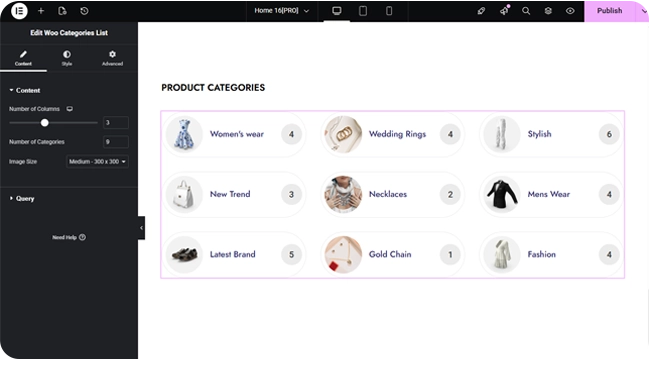
The Woo Categories List widget shows your WooCommerce product categories as a compact list — a small thumbnail, the category name, and its product count in a pill, instead of the larger image cards used by Woo Categories.

Adding the Widget #

  1. Open the page in the Elementor editor.
  2. Search the widget panel for Woo Categories List, under the BEW Elements category.
  3. Drag it into any section or column — a sidebar is a common spot.
Layout #

  • Number of Columns — a responsive slider up to 6.
  • Number of Categories — how many to show at once (up to 100, defaults to 3).
  • Image Size — which registered WordPress image size to use for each category’s thumbnail (defaults to Medium; the Image style section further caps the displayed size).

Choosing Which Categories Show #

Identical to Woo – Categories: a Source of Show All, Manual Selection, or By Parent, a Hide Empty switch (on by default), and Order By / Order controls.

Styling #

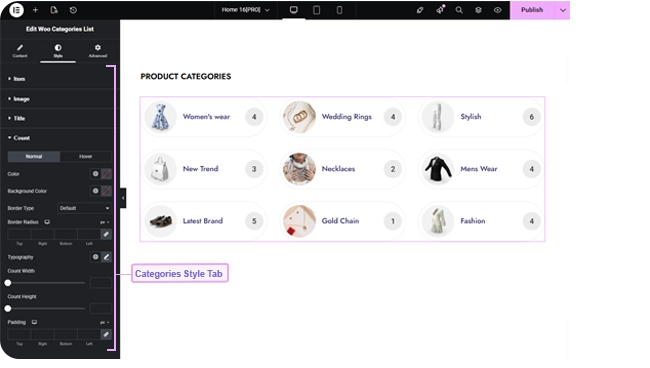
  • Item — row background for Normal and Hover, hover border color, border, border radius, row and column gap, box shadow, and padding.
  • Image — image size, border, hover border color, border radius.
  • Title — color, hover color, typography, content alignment (defaults left), and margin.
  • Count — the product-count pill: color, background, and border for Normal and Hover, typography, border radius, width, height, and padding.
Frequently Asked Questions #

#

Same query options and data, but a compact row layout with a small thumbnail and a product-count pill, instead of large image cards — better suited to a sidebar or narrow column.

#

Yes — set Source to By Parent and choose the parent category.

#

The thumbnail set on that category in WooCommerce (Products → Categories → edit category), or WooCommerce’s placeholder image if none is set.

Updated on September 2, 2026

What are your Feelings

  • Happy
  • Normal
  • Sad

Share This Article :

  • Facebook
  • X
  • LinkedIn
  • Pinterest
How to use Woo Products ListHow to use Woo Archive Carousel
Table of Contents
  • Adding the Widget
  • Layout
  • Choosing Which Categories Show
  • Styling
  • Frequently Asked Questions
    • How is this different from Woo - Categories?+
    • Can I show only the subcategories of one category?+
    • Where does the thumbnail image come from?+
bew-logo-white

Everything you need to build stores and websites with Elementor: widgets, modules, 2,500+ templates, and AI content generation — all in one plugin.

Company
  • Affiliate Program
  • Privacy Policy
  • Terms & Conditions
  • Blog & News
Support
  • Support Center
  • Documentation
  • My Account
  • Community Forum
Product
  • Features
  • Templates (3,000+ library)
  • AI Builder
  • Plans & Pricing

Copyright © 2026 BEW. Made with

  • by
  • Bosa Themes