Skip to content
default-logo
  • Home
  • Templates
  • Widgets
  • Modules
  • AI Builder
  • Pricing
  • Support
Buy Now

Getting Started

3
  • How to Install & Update BEW
  • How to Install, Activate & Update BEW Pro
  • BEW Dashboard & Settings Overview

How to use BEW Template Library

5
  • Getting started with Template Library
  • About Kits, Pages & Sections
  • Template Library Modal Guide
  • How to Insert Templates
  • Required Plugins When Inserting Templates

How to use BEW Widgets

24
  • Getting started with Widgets
  • How to Setup BEW Site Logo
  • How to use Dropdown Nav
  • How to use Woo Cart
  • How to use Woo Search
  • How to use Woo My Account
  • How to use Woo YITH Wishlist
  • How to use Woo YITH Compare
  • How to use Blog Grid
  • How to use Contact Form 7
  • How to use Woo Categories
  • How to use Woo Products List
  • How to use Woo Categories List
  • How to use Woo Archive Carousel
  • How to use Woo Archive Products
  • How to use Image Carousel [ PRO ]
  • How to use Testimonial Slider [ PRO ]
  • How to use Woo Product Slider [ PRO ]
  • How to use Woo Product Accordion [ PRO ]
  • How to use Woo Product Tabs [ PRO ]
  • How to use Woo Grid Carousel [ PRO ]
  • How to use Woo Hot Deals [ PRO ]
  • How to use Woo Grid Products [ PRO ]
  • How to use Query Management

How to use BEW Site Modules

4
  • Getting started with Site Modules
  • How to use Back to Top
  • How to use Site Preloader
  • How to use Reading Progressbar [PRO]

How to use BEW AI Builder

11
  • Getting Started with BEW AI
  • AI Provider Integration
  • How to use Text Generator
  • How to use Image Generator
  • How to use Bulk Text & Image Generator
  • How to use Repeater Generator
  • How to use Products Generator
  • How to use Blog Generator
  • How to use Saved Presets
  • How to use Generation History
  • Troubleshooting AI Builder

Frequently Asked Questions (FAQs)

1
  • BEW Frequently Asked Questions
View Categories
  • Home
  • Docs
  • How to use BEW Widgets
  • How to use Query Management

How to use Query Management

1 min read

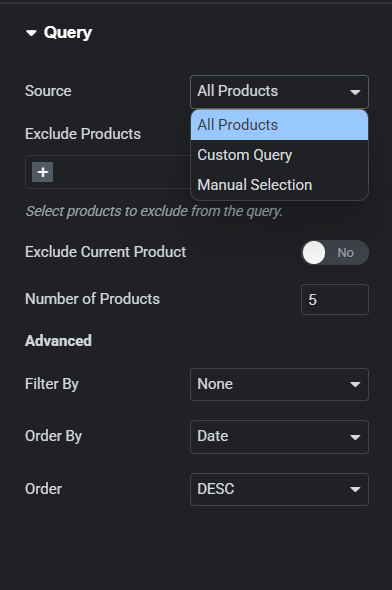
In Query Section you will see Source control in which you can have three different option

  • All Products
  • Custom Query
  • Manual Selection

All Products #

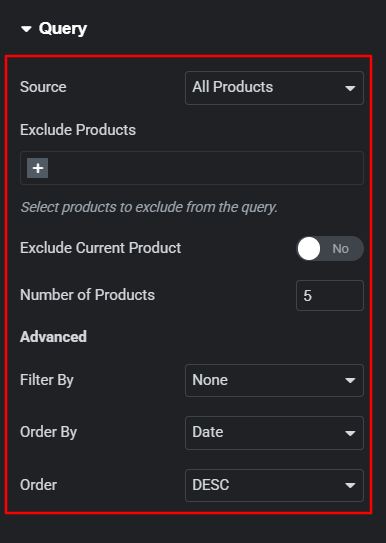
In All Products you will see latest products in your page.

Exclude Products â€“ remove selected products from your page.

How to Setup Product Numbers

In All Product option use the Number of Products option to set the number of products in your page.

Advance Features

In All Product option you will find advance features where you will see following controls:

  • Filter By
  • Order By
  • Order

Filter By

Use Filter By control to filter out the featured and sales products.

Order By

In Order By Control you can find following options which will helps you to manage your product accordingly.

  • Date
  • Title
  • Price
  • Popularity
  • Rating
  • Random
  • Menu Order

Order â€“ Use Order control to manage your product in ascending and descending order.
Custom Query #

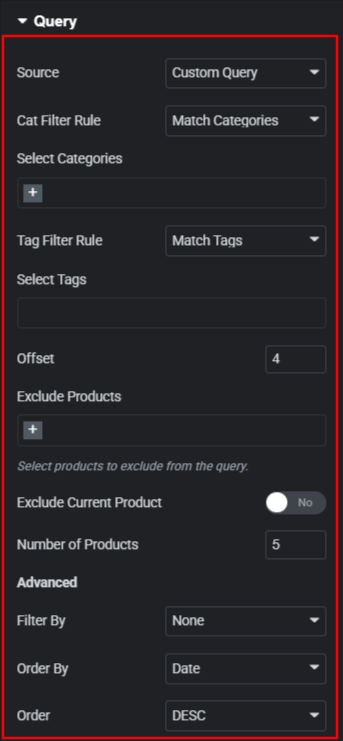
Display Product according to selected query.

  • Cat Filter Rule
  • Tag Filter Rule

Cat Filter Rule

Display Product according to the selected product Categories. Contains two major select option Match Categories and Exclude Categories.

Tag Filter Rule

Display Product according to the selected product Tags. Contains two major select option Match Tags and Exclude Tags.

Offset â€“ Enable the query to skip a certain number of product starting output.

Exclude Products â€“ remove selected products from your page.

How to Setup Product Numbers

In Custom Query use the Number of Products option to set the number of products in your page.

Advance Features

In Custom Query you will find advance features where you will see following controls:

  • Filter By
  • Order By
  • Order

Filter By

Use Filter By control to filter out the featured and sales products.

Order By

In Order By Control you can find following options which will helps you to manage your product accordingly.

  • Date
  • Title
  • Price
  • Popularity
  • Rating
  • Random
  • Menu Order

Order Use Order control to manage your product in ascending and descending order.
Manual Selection #

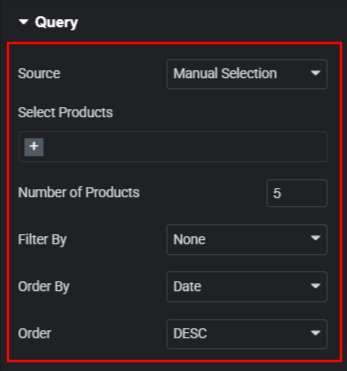
In Manual Selection Use Select Products option to display products.

How to Setup Product Numbers

In Manual Selection option use the Number of Products option to set the number of products in your page.

Advance Features

In Manual Selection you will find advance features where you will see following controls:

  • Filter By
  • Order By
  • Order

Filter By

Use Filter By control to filter out the featured and sales products.

Order By

In Order By Control you can find following options which will helps you to manage your product accordingly.

  • Date
  • Title
  • Price
  • Popularity
  • Rating
  • Random
  • Menu Order

Order Use Order control to manage your product in ascending and descending order.
Updated on August 16, 2026

What are your Feelings

  • Happy
  • Normal
  • Sad

Share This Article :

  • Facebook
  • X
  • LinkedIn
  • Pinterest
How to use Woo Grid Products [ PRO ]Getting started with Widgets
Table of Contents
  • All Products
  • Custom Query
  • Manual Selection
bew-logo-white

Everything you need to build stores and websites with Elementor: widgets, modules, 2,500+ templates, and AI content generation — all in one plugin.

Company
  • Affiliate Program
  • Privacy Policy
  • Terms & Conditions
  • Blog & News
Support
  • Support Center
  • Documentation
  • My Account
  • Community Forum
Product
  • Features
  • Templates (3,000+ library)
  • AI Builder
  • Plans & Pricing

Copyright © 2026 BEW. Made with

  • by
  • Bosa Themes